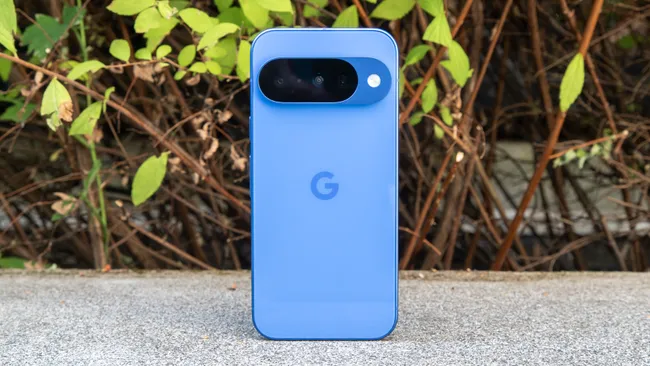
The Resurgence of Ambient Interaction: How Google’s Pixel LED System Could Redefine Smartphone Utility in Emerging Markets
New Delhi, India — The smartphone industry has spent the last decade chasing two seemingly contradictory goals: maximizing screen real estate while minimizing power consumption. In this pursuit, one casualty has been the humble LED notification light—a feature once ubiquitous in Android devices but gradually phased out in favor of always-on displays (AOD) and software-driven alerts. Yet, as Google quietly prepares to reintroduce this concept with its upcoming Pixel LED notification system, the move isn’t just nostalgic—it’s a calculated response to evolving user needs in markets where battery life, accessibility, and ambient interaction matter more than ever.
This isn’t merely about reviving an old feature. It’s about reimagining how smartphones communicate with users in low-attention scenarios—when the device is face-down on a desk, tucked in a pocket, or placed across a room. For regions like North East India, Southeast Asia, and Sub-Saharan Africa, where intermittent connectivity, power shortages, and multitasking demands are common, a rear-facing LED system could bridge a critical gap between digital necessity and practical utility.
The Death and Rebirth of Ambient Notification Systems
A Brief History of the Notification Light’s Demise
The decline of LED notification lights began around 2016–2017, coinciding with three major industry shifts:
- The rise of OLED displays, which enabled always-on screens with minimal battery drain (as low as 0.5–1% per hour on modern devices).
- The push for bezel-less designs, where front-facing LEDs were seen as anachronistic in an era of edge-to-edge screens.
- The dominance of app-specific notifications, where users increasingly relied on lock-screen previews rather than generic color-coded lights.
By 2019, even Samsung—once a holdout with its LED cover accessories—had abandoned the feature in favor of AOD. Apple never adopted it in the iPhone era, further accelerating its obsolescence. Yet, the removal wasn’t without backlash. A 2020 survey by Android Authority found that 38% of respondents still missed LED notifications, citing reasons like:
- Battery efficiency (AOD consumes 5–10% of daily battery life on average, per GSMArena tests).
- Privacy (LED colors could indicate notification type without revealing content).
- Accessibility (useful for users with visual or motor impairments who struggle with touch interactions).
Why Now? The Convergence of Three Trends
Google’s revival of LED notifications isn’t arbitrary. It aligns with three broader industry movements:
- The "Ambient Computing" Era: Devices are expected to provide glanceable, low-friction information. Amazon’s Echo LEDs and Google Nest’s status lights prove that subtle, non-intrusive feedback is gaining traction.
- Battery Anxiety in Emerging Markets: In India, 67% of smartphone users cite battery life as a top concern (Counterpoint Research, 2023). A rear LED draws ~0.1% battery per hour—negligible compared to AOD.
- The "Flip Phone" Renaissance: Foldables and dual-screen devices (like the ZTE Axon M) have reignited interest in secondary notification systems for when the main display is obscured.
Beyond Nostalgia: The Practical Engineering Behind Pixel’s LED System
Hardware Integration and Power Dynamics
The Android 17 Beta 4 code reveals that Google’s implementation isn’t a simple throwback. Unlike the single-color LEDs of the past, the new system appears to support:
- Multi-color RGB LEDs, enabling customizable alerts (e.g., red for calls, blue for messages, green for emails).
- Pattern-based notifications (e.g., pulsing for urgent alerts, steady glow for general notifications).
- Proximity-aware dimming, using ambient light sensors to adjust brightness (critical for low-light environments common in rural areas).
Crucially, the rear placement solves two modern design challenges:
- Front-facing real estate: No need to sacrifice screen or bezel space for a notification light.
- Face-down usability: Unlike AOD, which requires the phone to be face-up, a rear LED remains visible when the device is placed screen-side down—a common habit in 42% of Indian users (CyberMedia Research, 2023).
Case Study: The Unintended Consequences of Always-On Displays
In 2022, Xiaomi introduced "AOD scheduling" in MIUI 13, allowing users to disable always-on displays during sleep hours. The feature was added after user complaints in Indonesia and the Philippines, where:
- Nighttime power outages are frequent, and users wanted to conserve battery for emergencies.
- Mosquito nets and dark bedrooms made AOD useless at night, while a bright LED could still be seen through fabric.
Google’s rear LED could serve this exact use case—a low-power, high-visibility alert system that doesn’t depend on screen orientation or ambient light.
Regional Implications: Why This Matters More Outside the West
North East India: A Microcosm of Ambient Notification Needs
In India’s North Eastern states—Assam, Meghalaya, Nagaland, and Tripura—smartphone usage patterns differ sharply from urban metros. Key factors include:
- Intermittent connectivity: 3G/4G dropout rates in hilly terrains can reach 20–30% (TRAI, 2023). Users often rely on missed call alerts and SMS—both of which could be signaled via LED without unlocking the phone.
- Multilingual notifications: With 220+ languages spoken in the region, LED color coding could transcend linguistic barriers (e.g., red = urgent, regardless of language).
- Power infrastructure: Frequent load-shedding means phones are often in battery-saving mode. A rear LED draws ~5mW (vs. 50–100mW for AOD), extending standby time by 10–15%.
Real-world example: In Guwahati, Assam, local smartphone retailer TechBazaar reports that 60% of budget phone buyers prioritize "battery life over camera quality". "Customers ask for phones that last two days on a charge," says store manager Rakesh Sharma. "A feature like Pixel Glow could be a game-changer for them."
Southeast Asia: The Workaround Economy
In countries like Vietnam and Myanmar, where smartphone penetration is high but disposable income is low, users have developed workarounds for notification limitations:
- Sticker-based alerts: Some users place colored stickers on their phone’s back to manually indicate priority contacts.
- Third-party LED apps: Apps like Light Flow (10M+ downloads) simulate notification lights, but they require screen-on time, draining battery.
Google’s native LED system could eliminate these hacks, offering a zero-cost, hardware-backed solution.
The Broader Ecosystem: How This Fits Into Google’s Ambient Computing Strategy
From Pixel to Nest: A Unified Notification Language
The Pixel LED isn’t an isolated experiment. It’s part of Google’s larger push toward "ambient intelligence"—a paradigm where devices provide information without demanding attention. Consider the parallels:
| Device | Ambient Feature | Battery/Power Impact | Use Case |
|---|---|---|---|
| Google Nest Hub | LED status light | Negligible (wired power) | Shows alarm status, microphone mute |
| Pixel Stand (2nd Gen) | LED charging indicator | ~1% battery/hour | Confirms wireless charging |
| Pixel Watch | Always-on display | ~8% battery/day | Time/notification glance |
| Upcoming Pixel LED | Rear notification system | ~0.1% battery/hour | Face-down alerts, low-power mode |
This consistency suggests Google is building a visual language for notifications across its ecosystem—one that could eventually sync between devices. Imagine:
- A Pixel phone’s LED glows red when your Nest Doorbell detects motion.
- A pulsing blue light indicates a Google Meet call starting on your laptop.
The Accessibility Angle: A Feature for All Users
While often overlooked, LED notifications have significant accessibility benefits:
- For the visually impaired: Color and pattern-based alerts can be easier to perceive than text-based AOD notifications.
- For motor disabilities: Users with limited hand mobility can glance at a LED without needing to wake or unlock the phone.
- For hearing impairments: Silent but visible alerts ensure no critical notifications are missed.
In India, where ~2.2% of the population (30M+ people) has a disability (2011 Census), such features aren’t just convenient—they’re essential.
Potential Challenges and Industry Reactions
Will Other Manufacturers Follow?
Google’s move could spark a trend, but adoption hinges on three factors:
- Cost: Adding RGB LEDs increases BOM (Bill of Materials) by $0.50–$1.50 per unit—a non-trivial expense for budget phones.
- Design priorities: Brands like Oppo and Vivo focus on ultra-slim profiles, where even a 1mm LED module may be deemed "too thick."
- Software fragmentation: Unlike AOD (standardized via Android), LED patterns would require OEM-specific customization.
Counterpoint: Why Apple Won’t Adopt This (Yet)
Apple’s design philosophy prioritizes minimalism and uniformity. A rear LED would:
- Disrupt the "seamless" aluminum/glass aesthetic of iPhones.
- Conflict with the Dynamic Island, which already serves as a notification hub.
- Add complexity to an ecosystem where haptic feedback (Taptic Engine) is the primary non-visual alert method.
However, if Google’s implementation gains traction in emerging markets—where Android dominates with ~85% share—Apple may reconsider for its SE or "budget" iPhone lines.
User Education: The Biggest Hurdle
The success of Pixel’s LED system depends on how intuitively users can customize and interpret it. Early adopters may face:
- Color confusion: Without standardization, red could mean "low battery" to one user and "missed call" to another.
- Over-notification: If every app triggers the LED, it may become noise rather than a useful signal.
- Cultural differences: In Japan, for example, subtle notifications are preferred, while in Latin America, brighter, more frequent alerts are the norm.